Nail Design Studio
- 4.7
- Rating
- 10.00K
- Installs
- Free
- Price

 Analysis by App-foxy
I tried Nail Design Studio as a beauty app for planning manicures, and its appeal became clear almost immediately: it turns nail inspiration into something I can explore on my own hand instead of leaving me to imagine how a color or pattern might look. That makes it more practical than a simple gallery, especially when I am deciding between several styles before booking an appointment or buying polish.
Nail Design Studio is made by DigiTide Blaze and is available free of charge for Android users. It has an Everyone content rating, so it is positioned as a broadly accessible creative tool rather than an app aimed at a narrow age group. The current release is version 1.5.1 and works on Android 7.0 or later, which is useful if you are using an older phone rather than a recent flagship.
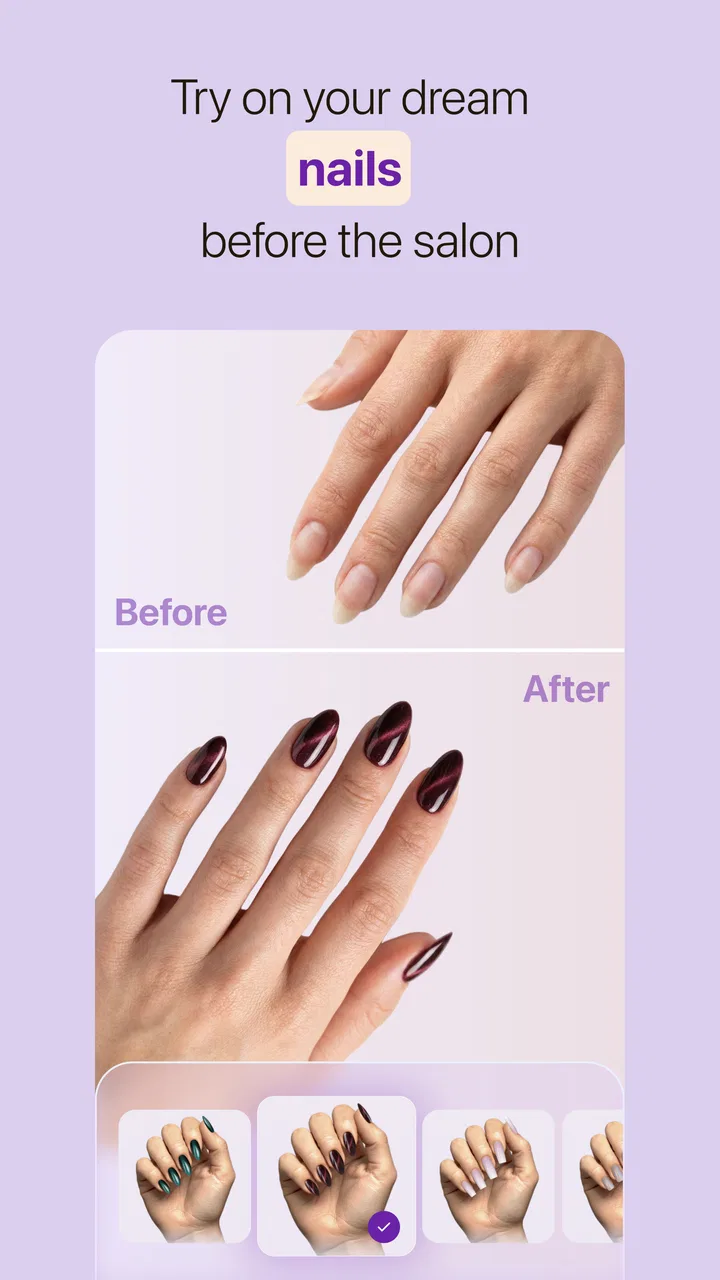
The store summary focuses on designing nail art, browsing manicure ideas, and previewing styles on a real hand with AI. In my experience, that combination is the important part. The app is not merely asking me to save attractive pictures; it is intended to help me make a decision. I can look for inspiration, test a direction visually, and then judge whether the result feels wearable for my own hands.
You May Also Like

 AccuWeather: Weather Radar
AccuWeather Review: A Quick, Clear Forecast for Everyday Decisions
For everyday plans, the best forecast is the one you can understand quickly. AccuWeather makes rain timing, radar, and local conditions easy to act on, with a few trade-offs.

 Hill Climb Racing
Why Hill Climb Racing Still Turns Crashes Into One More Run
A tiny car, a bumpy hill and one more upgrade: Hill Climb Racing keeps resurfacing because its simple chaos makes every near-miss feel personal.

 AliExpress - Shopping App
AliExpress Makes Global Shopping Feel Personal, but Shoppers Bear the Risk
AliExpress turns a global marketplace into a pocket-sized discovery engine. Its reach is useful, its shopping loop compelling, and its trade-offs easy to miss.

 Lords Mobile: Kingdom Wars
Lords Mobile Is a Kingdom-Building Routine, Not a Quick Match
A case-by-case verdict on the building, battles, device demands, and social commitments that make Lords Mobile rewarding for some players and exhausting for others.

 PDF Scanner app - TapScanner
TapScanner Makes Paperwork Easier to Capture, Check, and Share
TapScanner makes scanning with a phone feel less like a rescue operation and more like a dependable step in getting work done. Its capture tools are useful, though not flawless.

 Block Blast!
 Shows How Much a Puzzle Game Can Leave Out
A quiet grid game shows why puzzle players increasingly value instant clarity, repeatable skill and low-pressure play—and where the genre still needs to catch up.
More From Our News Desk
View All News


How Nail Design Studio fits into a real manicure routine
I find this routine most useful when I give the design session a clear endpoint: choose a look for one appointment, event, or week rather than browsing without a decision in mind. That keeps the hand preview focused on practical comparisons, such as whether a bold accent still feels comfortable for everyday wear. It also makes it easier to carry one considered idea into the next step: deciding what details are worth asking a nail technician to adapt.
Starting with inspiration instead of a blank canvas
One of the hardest parts of planning nail art is explaining an idea that exists only in your head. A reference image helps, but a reference image also creates a new problem: the design may look excellent on someone else and less convincing on your own hand. Nail Design Studio addresses that gap by bringing the exploration closer to a personal preview.
I found the most useful approach was to begin broadly rather than searching for one perfect design. I would first compare simple color directions, then look at decoration and shape ideas, and only afterward think about whether the complete look suited the occasion. This order matters because it prevents me from becoming attached to a complicated pattern before considering whether I would actually wear it.
The app is particularly helpful when I want to communicate with a nail technician. Instead of sending several unrelated screenshots, I can use the visual concept as a starting point for a conversation about color, detail, and how bold the finish should be. It does not replace that conversation, but it can make the conversation much clearer.
Using the hand preview as a decision tool
The real-hand preview is the feature that gives this app a reason to exist beside ordinary image searches. I can evaluate a style in context: whether the color feels too strong, whether a design looks balanced across the nails, and whether the overall mood matches what I had in mind. That is more useful than judging a close-up promotional image in isolation.
I would not treat the preview as a guaranteed representation of the final salon result. Lighting, camera angle, nail length, polish finish, and the technician’s execution can all change the outcome. The best way to use it is as a comparison tool. If two ideas are competing, the preview can help me choose the one that feels more natural on my hand, even if neither image should be read as an exact promise.
A practical workflow is to compare one variable at a time. I might keep the color family similar while changing the pattern, then keep the pattern and test a softer shade. This makes the visual differences easier to understand. If I change everything at once, the app may show me an attractive result, but I learn less about which part of the design actually works for me.
Where AI helps and where judgment still matters
AI is useful here because it speeds up experimentation. I can move from an abstract idea to a visual reference without manually drawing every detail. That lowers the effort needed to try something new, which is valuable for anyone who normally repeats the same safe manicure because searching for alternatives feels like work.
At the same time, AI previews should be treated as creative suggestions rather than technical instructions. Fine lines, tiny decorations, gradients, and complex arrangements may look especially polished in a generated image. A real manicure has limits related to nail size, tools, drying time, and the skill of the person applying it. I would show the image to a professional and ask what can realistically be simplified before committing to it.
This is one of the app’s more important trade-offs: it expands imagination, but it can also make an ambitious design look easier than it is. I consider that a manageable weakness as long as I use the preview to discuss possibilities instead of demanding an exact copy.
A realistic everyday scenario
Imagine that I have an appointment before a wedding or a holiday and only a vague idea of what I want. I could spend an evening scrolling through social media, saving dozens of images that do not quite match. With Nail Design Studio, I can narrow the search to a few themes, preview them on my hand, and remove the options that clash with my outfit or feel too dramatic for the event.
Before the appointment, I would keep the final concept nearby and note the parts that matter most: the main color, the accent nails, and any decoration I consider essential. I would also prepare a simpler fallback. If the detailed version proves impractical, the fallback can preserve the same color mood without creating a last-minute decision. That is where the app becomes more than entertainment; it can reduce uncertainty before a real purchase of salon time or products.
Free access and the meaning of paid value
The app itself is free to download, which makes trying the basic experience relatively easy. That matters for a beauty app because visual preference is personal. I would rather explore the workflow before deciding whether it deserves a place in my routine than pay upfront for an idea I may use only once before a special occasion.
There are in-app purchases ranging from $3.99 to $29.99 per item. Those prices are important when judging value, but they should not be confused with a required entry fee. The free starting point lets me decide whether the inspiration and preview process are genuinely useful to me. Paid value makes more sense for someone who uses the app repeatedly or wants deeper creative exploration, while an occasional user should be more cautious about spending.
I also think the purchase decision should be tied to a specific purpose. If I need one manicure idea for an upcoming appointment, a paid item may not be worthwhile unless it directly improves that decision. If I regularly plan different looks, test seasonal ideas, or use the app to communicate with a nail artist, the same purchase can feel more reasonable because the benefit is repeated rather than one-off.
The sensible approach is to judge the free experience first, then pay only when the added creative value solves a real problem for you. That keeps the cost evaluation grounded in actual use instead of assuming that every available purchase is necessary.
What the app does better than ordinary alternatives
Social platforms and image searches are still excellent for discovering trends and seeing work from real nail artists. They can offer more variety and more context about finished manicures. Their weakness is that inspiration often remains disconnected from my own hand. I may save a beautiful image without learning whether I like the same idea on myself.
Nail Design Studio’s advantage is the shorter path from discovery to personal evaluation. It is designed around trying a look rather than merely collecting one. That makes it better for decision-making, while a social platform may be better for following artists, learning techniques, or finding a wide range of authentic salon work.
It also compares favorably with manually sketching a design when I want speed. Drawing can be more precise and gives complete control, but it requires patience and some confidence. The AI approach is more approachable for someone who wants to test a mood quickly. The exchange is control: generated or assisted previews can be faster, while a hand-drawn plan may communicate exact details more reliably.
Limitations that affect the experience
The biggest limitation is the difference between visualization and execution. A preview can help me choose a direction, but it cannot guarantee that the final polish shade, texture, length, or decoration will match what I see. Anyone expecting a perfect digital-to-salon transfer may be disappointed.
There is also a risk of overplanning. Because it is easy to try many ideas, I can spend more time comparing designs than deciding. I found it more productive to set a small goal, such as choosing between three styles for one appointment, rather than endlessly exploring every possibility. The app works best when it supports a decision instead of becoming another feed to scroll through.
Another trade-off concerns the audience. Someone who already knows exactly what they want and has a trusted technician may gain little from AI visualization. Likewise, a professional nail artist looking for highly technical instruction may prefer specialist tools, reference libraries, or direct drawing software. This app is more valuable for exploration and communication than for replacing professional technique.
The purchase range also means that frequent experimentation can become more expensive than the free label initially suggests. I would not assume that every attractive option requires payment, but I would pay attention before confirming anything. For a person who only wants occasional inspiration, the free access may be enough. For a committed enthusiast, the value depends on how often the paid material is used and whether it meaningfully improves the planning process.
Who will get the most from it
I recommend Nail Design Studio most strongly to people who enjoy changing their manicure but struggle to turn vague ideas into a clear plan. It is also a good fit for beginners who feel intimidated by nail art terminology. Instead of trying to describe a complicated look immediately, they can use visual experimentation to discover what they like.
It can be useful for salon customers who want to arrive prepared. A few considered previews are easier to discuss than a long stream of unrelated saved images. It may also help someone choosing between a conservative office-friendly style and a more expressive weekend look, because the hand preview makes the contrast feel personal rather than theoretical.
Beauty enthusiasts can benefit from using it as a design notebook in practice, even if the app is not a formal notebook. I would capture a small set of ideas around a specific event, season, or color palette, then return to them when it is time to book an appointment. The key is to organize experimentation around real decisions instead of treating every result as something that must be tried.
Who should skip it
I would skip this app if I am looking for detailed nail-care education, step-by-step professional technique, or a replacement for an experienced technician. Its strength is visual planning, not hands-on instruction. I would also skip it if I dislike AI-assisted previews or prefer to choose only from photographs of completed real-world manicures.
It may not be the right choice for someone who rarely changes their nails and already has a reliable routine. In that situation, the app could add an extra planning step without solving a meaningful problem. A conventional image search may be faster for finding one familiar reference, while a salon consultation may be better for translating a very specific request into something practical.
My verdict on value
After using it, I see Nail Design Studio as a focused beauty companion rather than a complete manicure authority. Its free entry point makes experimentation accessible, and the hand-based AI preview gives it a practical edge over browsing inspiration alone. The strongest benefit is not that it produces a pretty image; it is that it helps me compare ideas before spending money or time on the real manicure.
The app has earned a 4.5 average from around 64 ratings, with over 10 thousand installs, which suggests that its concept is attracting early interest. Since it was released on January 6, 2026, I view it as a relatively new tool whose usefulness will depend on how well it continues refining the experience. The developer is DigiTide Blaze, and the current version is 1.5.1.
My recommendation is simple: try the free experience if you want help choosing a style, especially before an appointment or event. Use the previews as a discussion aid, compare designs deliberately, and keep a realistic fallback for anything too intricate. Consider paid items only when you know they will support repeated use or a particular decision. If you want technical lessons, a huge real-photo community, or exact professional planning, another type of beauty resource may suit you better.
For the right person, though, Nail Design Studio fills a useful gap between collecting inspiration and committing to a manicure. I would recommend it to curious beginners and regular salon customers who want to see an idea on their own hand before making the final choice.
FAQs for Nail Design Studio
01What features does Nail Design Studio offer?
Nail Design Studio provides a variety of features to enhance your nail art experience. Users can choose from a wide selection of nail shapes, colors, and designs, along with advanced tools for customization. The app also includes tutorials, style inspiration, and a virtual try-on feature to see how designs look before applying them.
02Is Nail Design Studio free to use?
Nail Design Studio offers a free version with basic features. However, it also includes in-app purchases for premium content such as exclusive designs, advanced tools, and ad-free browsing. Users can choose to purchase these features individually or subscribe to a monthly plan for full access.
03Can I use Nail Design Studio offline?
Nail Design Studio requires an internet connection for initial download and periodic updates. However, once downloaded, many design features and tools can be accessed offline. Some features, like community sharing and online tutorials, will need an internet connection to function properly.
04Is Nail Design Studio suitable for beginners?
Yes, Nail Design Studio is designed with users of all skill levels in mind. Beginners will find the app user-friendly, with step-by-step tutorials and design suggestions. The interface is intuitive, making it easy to experiment and create beautiful nail art without prior experience.
05How does Nail Design Studio ensure the accuracy of its virtual try-on feature?
Nail Design Studio uses advanced augmented reality technology to ensure the accuracy of its virtual try-on feature. By utilizing your device's camera and sophisticated algorithms, the app accurately maps nail shapes and sizes, allowing you to see a realistic preview of how designs will look on your nails before applying them.
Pros
- Intuitive user interface for easy navigation.
- Wide range of nail design templates available.
- Color customization is highly versatile.
- Regular updates with new design trends.
- Offline mode for designing without internet.
Cons
- Limited free features; many require purchase.
- Occasional lag on older devices.
- Ads can be intrusive during use.
- Some designs lack export options.
- Limited support for non-standard screen sizes.

Nail Design Studio
Gallery